Skip to content

Photocopier service management software

Your service operation. In one place.

SubClik brings service jobs, engineers, your customers’ printers and billing together. Printers report their own faults and meters, jobs open before the customer calls, invoices go to Xero or QuickBooks, and Direct Debit collects them.

  • Office portal
  • Engineer phone app, works offline
  • Printer monitoring built in
  • Data stored in the UK

What is SubClik?

A web-based workspace for photocopier service teams. Manage incoming jobs, coordinate engineers and keep a clear record of every repair.

See SubClik at work.

Real screens from the software, with a demo firm’s data: the office service desk and the engineer’s phone.
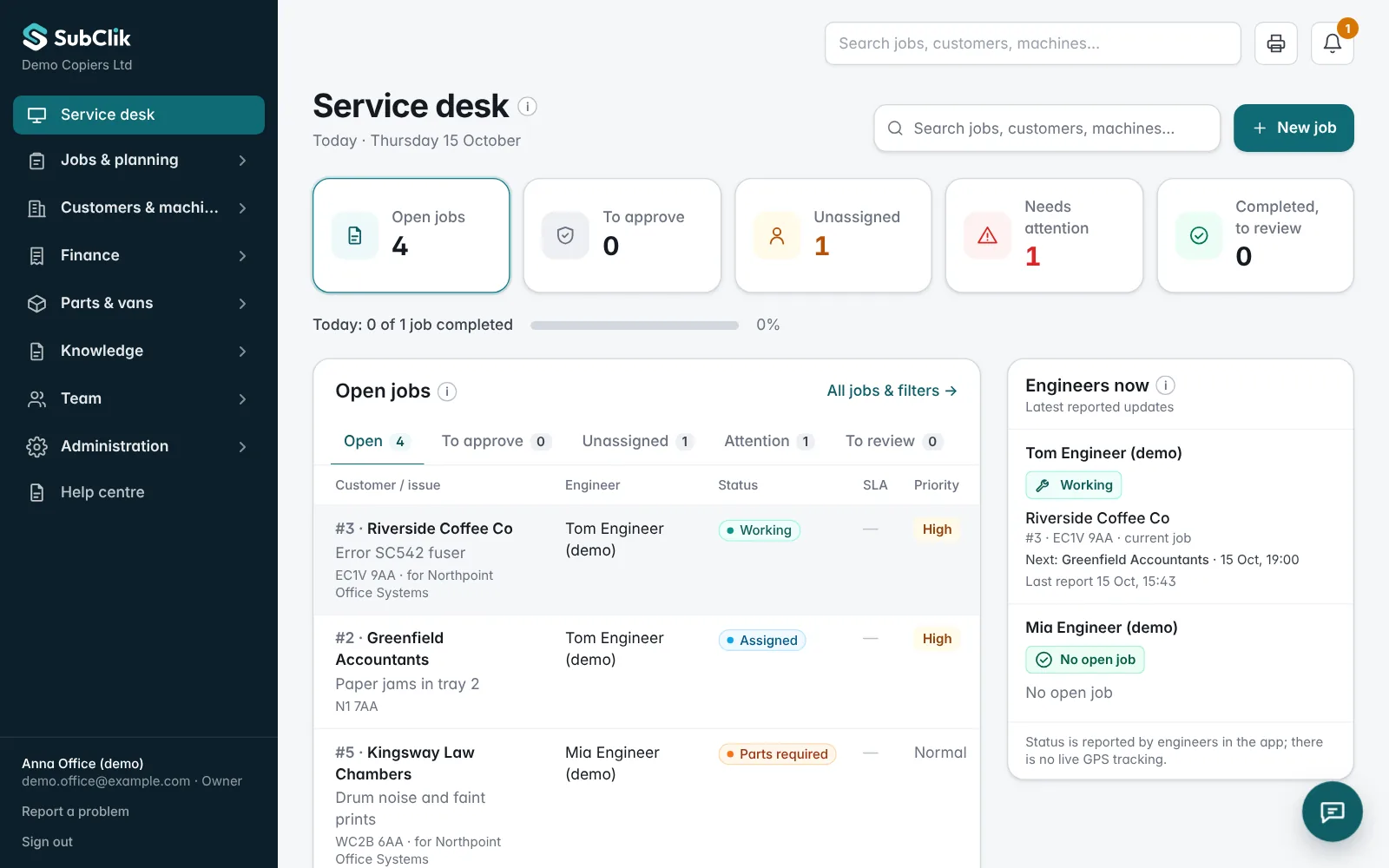
A demo firm’s data, from the first call to the finished job.
SubClik service desk listing open service jobs with status, customer and assigned engineer
Service desk: open jobs, status and the engineer on each one.

Built for the office. Ready for the field.

Built around photocopier service work.

01

Service desk & dispatch

Log faults, assign engineers and follow each job’s recorded status, from the first call to office review.

Explore the service desk →
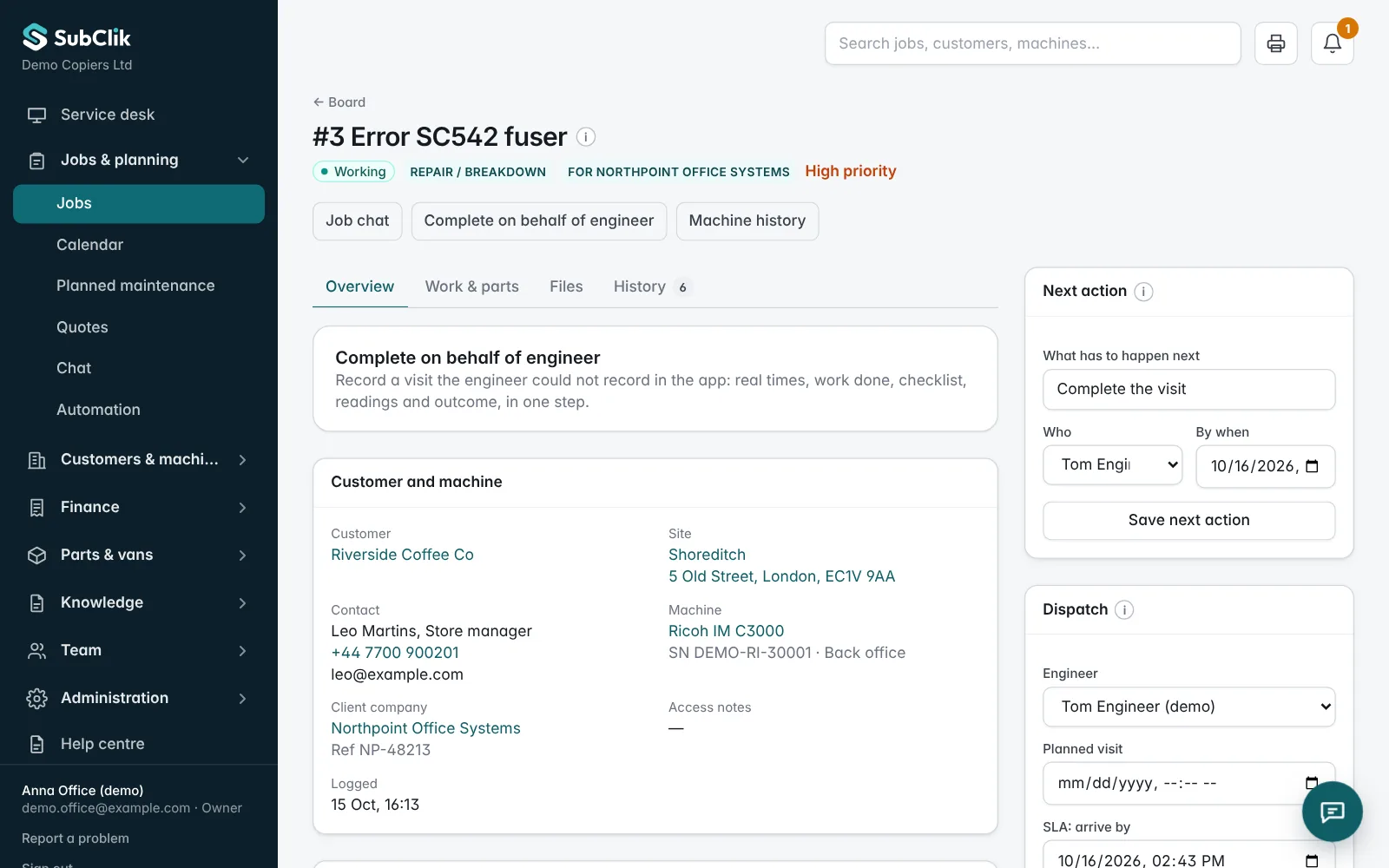
A service job in the office portal with the fault, machine, recorded time and parts
One job record: fault, machine, recorded time, parts and readings.
02

Engineer workspace

Engineers open assigned jobs on a phone and record work, time, parts, meter readings and the customer sign-off.

Explore the engineer workspace →
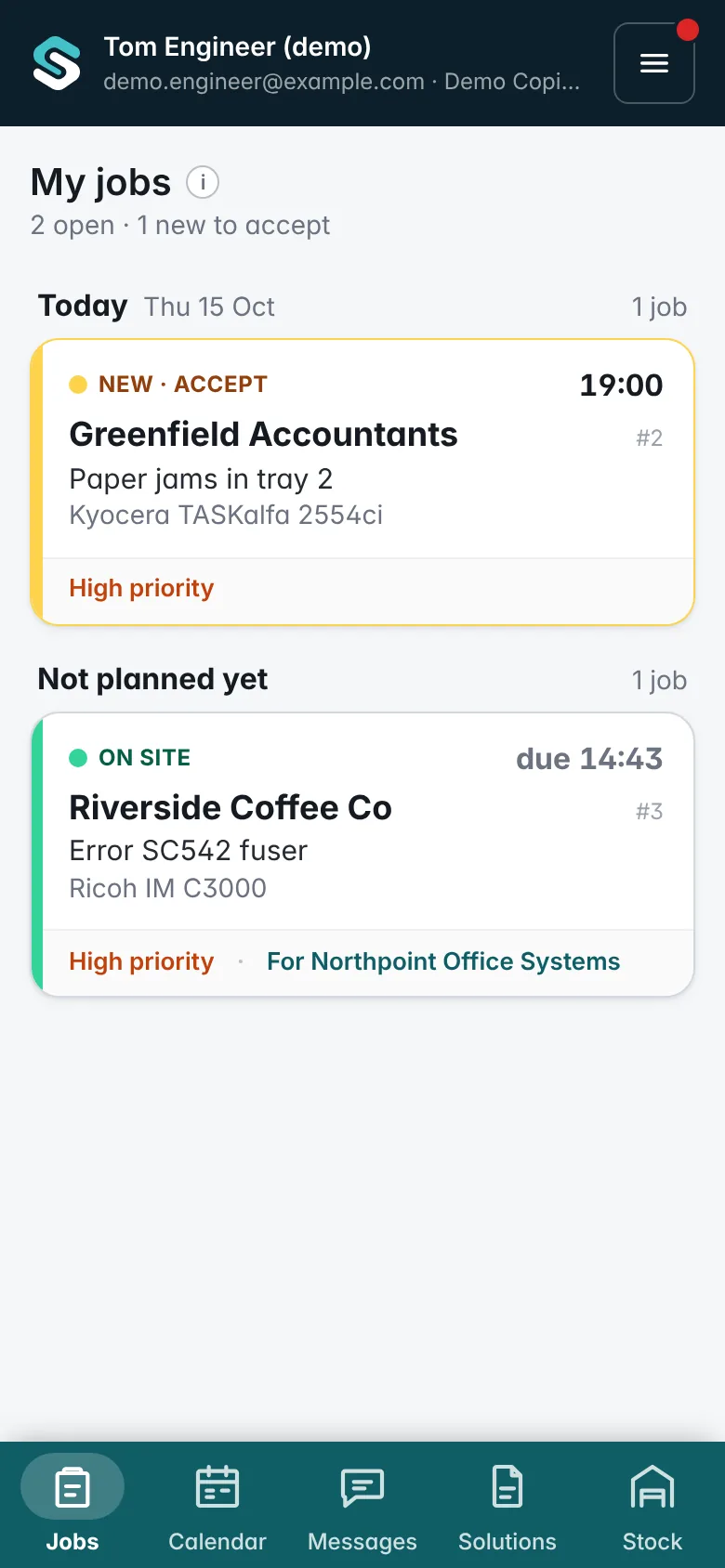
The engineer's list of assigned jobs on a phone
The engineer's assigned jobs on a phone.
03

Customers & machine history

Keep customer sites, device details, meter readings and previous visits together on each machine.

Explore machine service history →
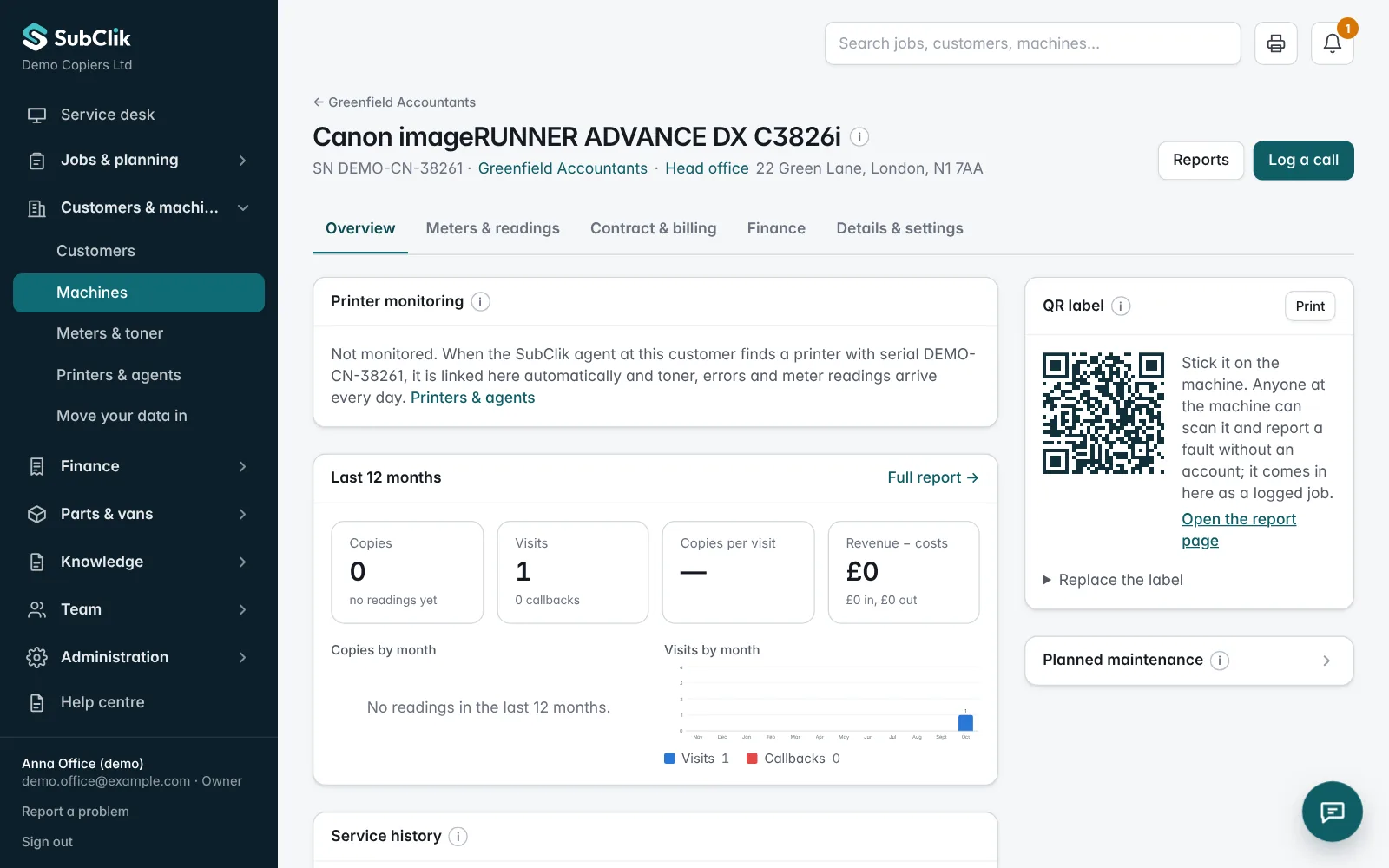
A machine record with serial number, site, meter readings and previous service visits
Machine record: site, meters and previous visits.
04

Contracts & billing

Bring service prices, contract rates and recorded work into the billing process.

Explore contracts and billing →
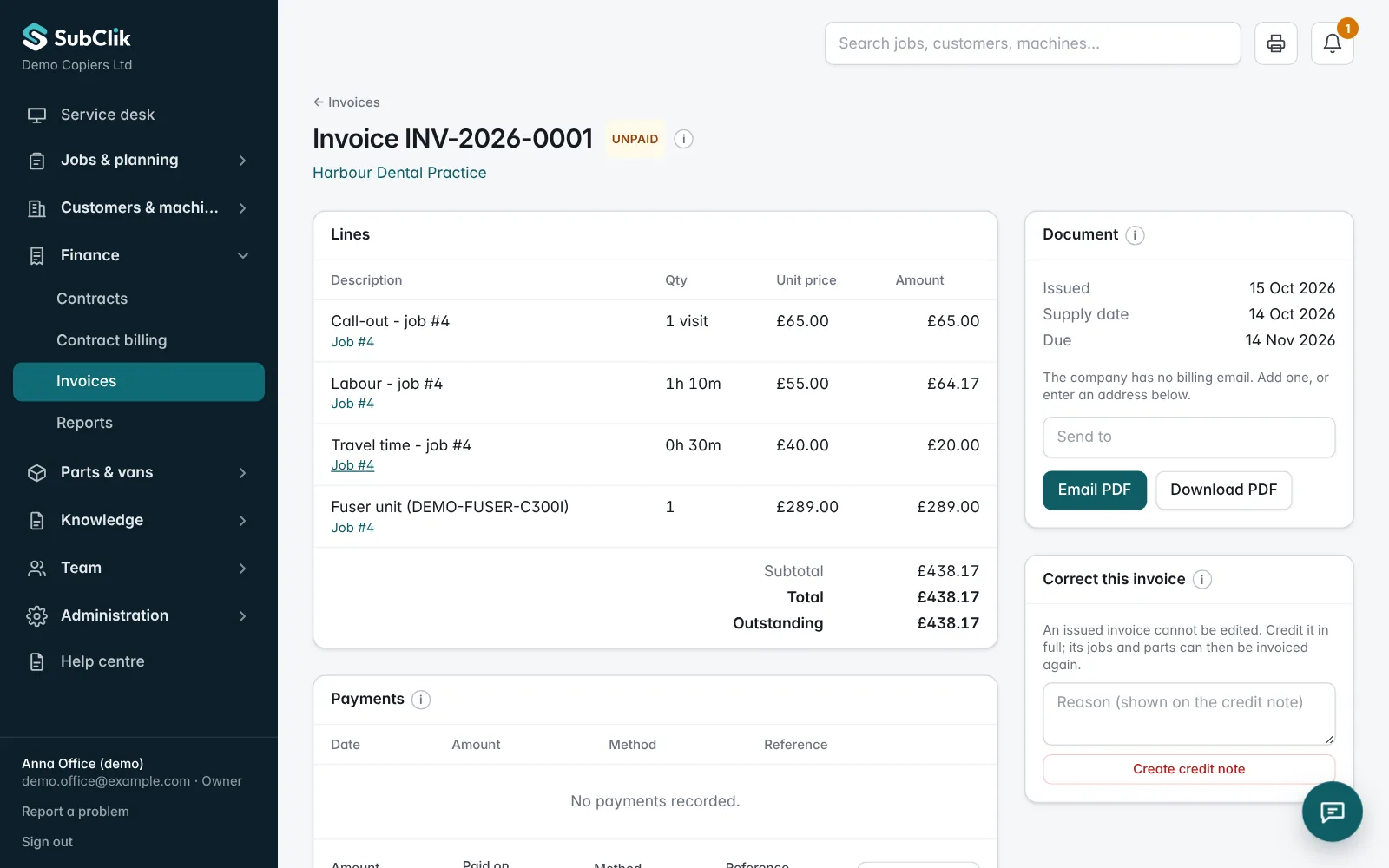
An issued invoice built from the job: call-out, labour 1h 10m, travel 30 min and the fitted part
An invoice built from the recorded job, ready to send as a PDF.

Know about the fault before the customer calls.

The SubClik Agent watches every printer at your customer’s site. When a copier jams, shows a service code or runs low, you know within a minute, and SubClik can open the job for you.

  • Daily meters and toner from every networked printer
  • Jams, error codes and doors open within a minute, with the code
  • A service job opens itself, with your priority and engineer
  • Toner listed for sending before it runs out
Automation · automatic service jobs
Your rule:✓ Service and error codes✓ Memory errors✓ 5+ jams in 7 days
  1. 07:42

    Printer reports SC542

    Ricoh IM C3000 · Canary Bank, 3rd floor

  2. 07:43

    Job #2431 opened automatically

    Priority high · given to Aisha, from your rule

  3. 07:43

    Earlier fixes for SC542 attached

    2 jobs in your firm fixed this code before

  4. 08:05

    Aisha accepts on her phone

    The customer has not called yet

Never two open jobs for the same machine.

Illustration with demo data

Your customers see their machines. Your accounts stay in step.

Give each customer a sign-in to see their machines live, the service call in progress and their invoices, and to report a fault or order toner.

Invoices go to Xero or QuickBooks when they are issued, customers pay by Direct Debit or card, jobs appear in your engineers’ calendars, and printer problems and new jobs post to your team chat.

  • Xero
  • QuickBooks
  • GoCardless
  • Stripe
  • Google Calendar
  • Outlook
  • iPhone calendar
  • Slack
  • Microsoft Teams
  • Google Chat
  • Zapier
  • Make
Canary Bank · your machines and service

3

machines

1

need attention

1

open service call

  • Ricoh IM C3000 · 3rd floor

    Meter 182,406 · today

    Engineer booked
  • Canon iR-ADV C5535 · Reception

    Meter 251,877 · today

    Ready
  • Kyocera ECOSYS P3150dn · Post room

    Meter 41,920 · today

    Toner low
Service call #2431 · SC542 on the Ricoh · Aisha on the way, arriving around 10:30
  • INV-1061 £214.80Due 31 Oct
  • INV-1042 £186.00Paid
  • INV-1017 £96.00Overdue
Report a faultOrder toner
Illustration with demo data

From the first fault to the paid invoice.

  1. 01

    Log the job

    Take a call or a fault report from the portal or QR label, or let the printer open the job itself.

  2. 02

    Assign the engineer

    Allocate the right engineer and plan the visit on the shared calendar.

  3. 03

    Record the repair

    Work, time, parts, meter readings and the customer’s signature, on the phone.

  4. 04

    Invoice and get paid

    Review, invoice and send to Xero or QuickBooks. Collect by Direct Debit or card; payments mark the invoice paid.

Set up around the way your team works.

Configure your job types, checklists, parts and service prices. Keep your company details and working settings in one place.

  • Job types with engineer checklists
  • Parts and fixed-price services
  • Company details on job sheets
  • Working hours and response times
  • Rules for jobs opened by printers
  • Xero, QuickBooks, GoCardless, Stripe, calendar and chat

Questions

Who is SubClik for?
Copier and printer dealers and service firms in the UK that need to coordinate office work, field engineers, customers’ machines and billing.
Can engineers use it on a phone?
Yes. The engineer app runs in the phone’s browser, keeps working without signal and sends everything when the phone is back online. We can show you the engineer workflow during a demo.
Does SubClik read meters automatically?
Yes, for networked printers. The SubClik Agent for Windows at the customer’s site reads meters and toner every day and watches for jams and error codes every minute. See printer monitoring.
Does it work with Xero?
Yes, and with QuickBooks Online. Invoices and credit notes go across when they are issued, and payments recorded there mark the invoice paid in SubClik. Customers can also pay by GoCardless Direct Debit or a Stripe card link. See integrations.
How do we get started?
Book a demo and tell us how your office handles calls, dispatch and service records. We’ll walk you through the software and discuss the right setup. See how it works.

See how SubClik could fit your service team.

Tell us about your office, engineers and current workflow. We’ll walk you through the software and discuss the right setup.